

Transforming Education With LED Displays
Creating clearer teaching, calmer campuses, and spaces that adapt
Education spaces are being asked to do more than ever.
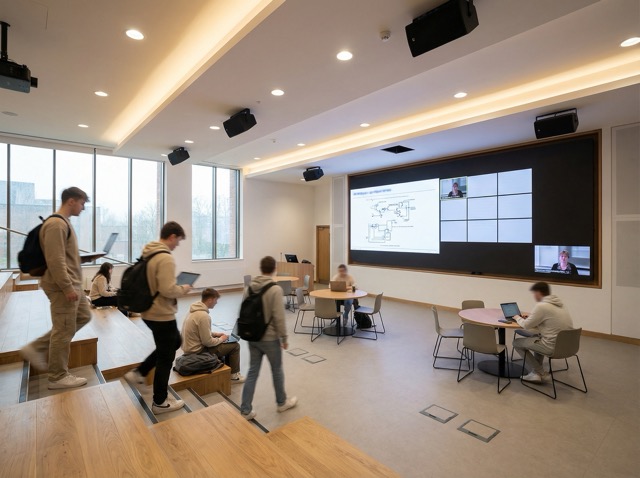
A lecture theatre is no longer just a room for slides. It’s used for hybrid teaching, visiting speakers, panel discussions, and recorded content. A campus atrium is a front door, an events venue, and a wayfinding problem. Even a corridor outside a department becomes a communication surface when schedules change and students need clarity.
In that reality, direct view LED is becoming a serious tool for education, not because it is impressive, but because it is dependable. It creates large-format clarity, stays legible in mixed light, and supports spaces that shift purpose throughout the day.
Megascreens sits in a specific niche: indoor, fine pitch direct view LED for environments where reliability and visual consistency matter. In education, that translates into one thing.
The screen needs to work every day, and it needs to look right doing it.
1) Better teaching starts with better visibility
In a lecture theatre or teaching lab, the display is part of the learning outcome. If the content is difficult to read, students disengage quickly.
Fine pitch direct view LED supports teaching environments where:
- students sit at varied distances and angles
- ambient light changes across the day
- content includes small detail: diagrams, code, data, or medical imagery
- the room needs to be recorded or streamed reliably
Unlike projection, a DV LED wall maintains clarity in brighter rooms and avoids the common “washed out” problem when daylight is present. Unlike many large-format LCD arrays, it provides a seamless surface, which matters when you’re displaying a single canvas of content like a timeline, a map, a design layout, or a complex chart.
The important point is not the technology headline. It’s the practical outcome.
Students can see the content properly from where they are sitting.
2) Hybrid learning needs a display surface that behaves predictably
Hybrid teaching is now normal in many institutions. That brings a different demand.
A screen isn’t just showing slides. It often needs to present:
- lecturer content and remote participants together
- live annotation
- document cameras or lab feeds
- two or three content sources at once without feeling cramped
This is where a large, reliable LED surface helps. It gives the room a consistent visual anchor, supports multi-window layouts, and reduces the “small screen at the front” effect in deeper lecture spaces.
For staff, predictability matters as much as picture quality. If the display behaves the same way every time, teaching runs smoother. Less time is spent troubleshooting. More time is spent teaching.
3) Wayfinding and campus communication becomes calmer and more accurate
Campuses change constantly. Rooms move. Events shift. Access routes close. Timetables update.
Static signage struggles to keep up. People get lost. Reception and support teams repeat the same directions. Students arrive late to sessions they were trying to find.
Placed at key decision points, LED displays can show:
- building directories by floor and department
- live room and lecture theatre availability
- event routes and visitor guidance
- timetable changes and service messages
- emergency instructions when required
The value is simple. Information becomes visible, consistent, and current.
In bright atriums or glazed circulation spaces, this is also where higher brightness configurations can matter. Megascreens’ MS Max Bright exists for environments with high ambient light or daylight exposure, where standard indoor systems would wash out. Brightness is always configuration-dependent, and should be selected to suit the space rather than pushed for effect.
4) Multi-use education spaces need displays designed as systems
Many education spaces now shift purpose across the day.
A hall used for teaching in the morning becomes a guest lecture venue in the evening. A central space hosts open days, employer fairs, exhibitions, and awards ceremonies. A library becomes a presentation and collaboration zone.
Direct view LED supports this shift well, but only when the project is designed as a system:
- defined operating modes (teaching, event, welcome, closed)
- templates for content so screens stay calm and legible
- governance: who publishes updates, and what is allowed
- integration with the wider AV and building environment
A screen that is technically excellent can still fail if content becomes unmanaged. In education, that usually shows up as cluttered messaging, inconsistent formats, and poor readability.
The goal is not to “use the screen more”. The goal is to make it quietly useful.
Engineering considerations that matter in education
Education environments have their own constraints. Term time is busy. Downtime is expensive. Spaces are shared. Maintenance windows are limited.
A few engineering choices make the difference.
Visual comfort, not maximum brightness
In teaching spaces, you want comfortable clarity across long sessions. Brightness should match the room, the content, and the viewing distance. Over-driving a display to look “punchy” can create fatigue.
Long-hour reliability
Lecture theatres and public spaces run for long daily hours. Systems need stable performance over time, with consistent colour and brightness across the full surface.
Service access that respects the building
Front-service access and modular design matter because they reduce disruption. When maintenance is needed, it should be planned, discreet, and fast.
Durability in high-traffic environments
Education buildings are busy. Screens in public areas need to tolerate real life. Protective LED options such as GOB configurations can be appropriate where physical resilience matters, without compromising the visual standard expected indoors.
Where Megascreens systems fit in education
Education environments are varied. One screen type rarely suits everything. The better approach is matching the system to the job.
MS Pro Series
Megascreens’ flagship permanent indoor fine pitch system. Best suited to:
- lecture theatres and auditoriums
- learning commons and collaboration spaces
- faculty reception walls and experience areas
It’s designed for close viewing distances and long-hour operation, with emphasis on stability and architectural integration. This is typically the right choice when the display is part of the room, not a temporary asset.
MS All-in-One
An integrated LED solution for environments where speed and simplicity matter. Useful for:
- multi-purpose halls
- training rooms and flexible teaching spaces
- conference-style education environments where quick setup matters
It’s a practical option when you need a high-quality large display without the complexity of a permanent wall build in every room.
MS Pro Rental
A robust modular system designed for touring, exhibitions and longer-duration temporary installs. In education, it fits:
- graduations and awards ceremonies
- open days and recruitment events
- visiting speaker programmes and temporary venues
It’s the right tool when the display needs to scale, move, and be deployed repeatedly with confidence.
MS Poster
A fast-deploying portable LED display designed for plug-and-play use. In education settings, it suits:
- admissions and welcome areas during peak periods
- departmental showcases and student exhibitions
- careers fairs and employer events
It’s a strong option when you need flexibility and mobility without turning every display into a full AV project.
MS Max Bright
A high-brightness DV LED family designed for high ambient light and daylight exposure. In education, it can be relevant for:
- glazed atriums and entrance halls
- bright circulation spaces where standard indoor LED would wash out
Brightness should always be specified by environment and configuration, not treated as a headline number.
What changes when you specify LED the right way
The most valuable outcomes in education are not “wow moments”. They are operational.
- Teaching becomes clearer and more consistent across rooms.
- Hybrid learning feels less compromised.
- Campus communication becomes easier to trust.
- Multi-use spaces shift function without friction.
- Support teams spend less time correcting confusion.
This is what good display design looks like. Quiet, reliable, and built for how the building is actually used.
Frequently asked questions
Yes. DV LED displays are well suited to healthcare settings due to their high reliability, long lifespan, and excellent visibility. When specified correctly, they can be used safely in reception areas, waiting rooms, consultation spaces, and staff-only environments.
LED displays help patients feel more informed and at ease by providing clear wayfinding, appointment updates, and reassuring visual content. In waiting areas, they can reduce perceived wait times and create calmer, more welcoming environments.
Yes. LED screens can support telemedicine consultations, staff briefings, and internal communications by providing high-resolution visuals, accurate colour reproduction, and reliable performance for video and data sharing.
Modern DV LED systems are designed for minimal maintenance. Front-serviceable modules allow quick repairs without disruption, and remote monitoring enables proactive support — making them ideal for environments where uptime is critical.