

Direct View LED for Tradeshows

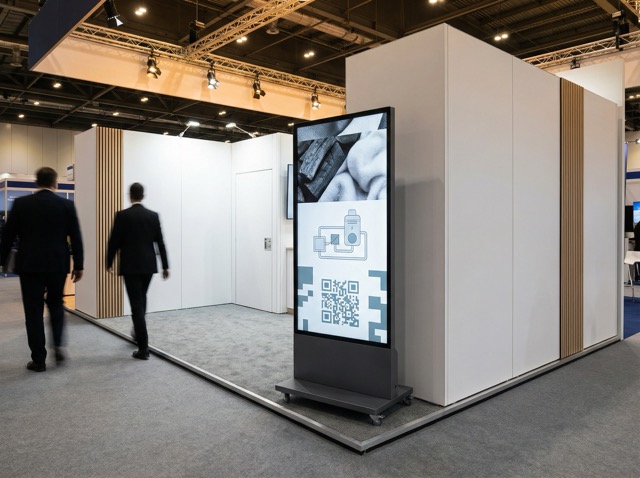
Practical display solutions that look premium, travel well, and set up fast
Trade shows reward clarity. You have a few seconds to earn attention, explain what you do, and make it easy for someone to stop.
That is where direct view LED makes sense. Not as spectacle, but as a reliable, high-impact surface that holds up under show lighting, repeated handling, and tight install windows.
Megascreens focuses on indoor, fine pitch DV LED for brand-critical environments. For tradeshows, that translates into systems that are portable, predictable, and simple to operate, without compromising on visual consistency.
What a tradeshow screen actually needs to do
A good tradeshow display has a narrow job:
- Stop people long enough for a conversation to start
- Explain quickly without needing sound
- Support the team on the stand with clear prompts and structure
- Set up and pack down without stress
That means the screen has to be operationally sensible. The best system is the one that looks great on the show floor and is still easy to live with at 7am on build day.
The simplest win: MS Poster for self-setup stands
If you want something effective that your team can set up themselves, MS Poster is built for that scenario.
It’s a freestanding vertical DV LED display designed for fast deployment and high reuse value. Key characteristics that matter on-site:
- Vertical format that suits product reels, campaign loops, and “hero message + visuals” layouts
- Integrated wheels for easy positioning on a stand
- Plug-and-play operation so you are not dependent on specialist technicians
- Front serviceable with GOB protection, which helps in high-traffic environments
- Approx. 35kg (without base) and designed to be moved and redeployed
- Around 600 nits for typical indoor exhibition lighting
- Fine pixel pitch options (~0.93–2.5mm) depending on viewing distance and how close people will stand
Where it fits best:
- Shell scheme stands
- Start-up pods
- Pop-up demo areas
- Hospitality zones on larger stands
- Product launch corners where you want a clean vertical canvas
Where it doesn’t:
- It is not for daylight shopfront cut-through
- It is not for building large seamless walls
For most exhibitors, MS Poster is the practical sweet spot: it looks premium, it moves easily, and it avoids the complexity that makes teams dread event logistics.
When you need scale: MS Pro Rental for feature walls and impact zones
For larger stands, you often need a different job done.
A wide back wall might carry:
- a slow, high-quality brand film loop
- a product system diagram that anchors conversation
- a live schedule for talks or demos
- a rotating set of sector-specific messages through the day
That is where MS Pro Rental comes in.
It is designed for events and touring where repeated builds are expected, and it supports:
- freestanding or flown builds
- modular walls with clean joins
- a more architectural finish across a larger surface
If your stand design is built around a main LED wall, MS Pro Rental is typically the right platform. It’s also the right choice when you need to reconfigure across multiple shows, or adapt the wall size to different booth footprints across the year.
Meeting rooms and presentation pods: MS All-in-One
Many stands now include a small enclosed space for:
- stakeholder meetings
- scheduled presentations
- live demonstrations where detail matters
In those settings, the requirement is not a huge wall. It is a high-quality, integrated display that behaves predictably and doesn’t turn into an AV project.
MS All-in-One is suited to these enclosed environments where simplicity matters and the screen is part of a repeatable format for demos, decks, and product walk-throughs.
Content that works on a show floor
The most common failure at tradeshows is not the screen. It’s the content.
A show floor is bright, busy, and noisy. Your content needs to be readable at a glance and calm up close. A few formats consistently work well on DV LED:
- A silent brand loop (10–20 seconds)
Clean footage, restrained pacing, strong product shots, minimal text. - A simple explainer sequence
Three beats: problem, approach, outcome. Use icons and diagrams that stay legible at distance. - A rotating use-case set
If you serve multiple sectors, cycle through them. Keep each use case visually distinct so repeat visitors notice the change. - A demo support layout
A clear “what we’re showing” header area, a large central visual, and a small side panel for a diagram or steps.
On a vertical MS Poster, content should be designed specifically for portrait. Avoid trying to crop down landscape videos. You will lose clarity and it will look improvised.
A practical way to choose the right DV LED approach
Start with three questions:
- Who is the screen for?
Passers-by, people already on the stand, or seated meetings. - What is the viewing distance?
Close-up detail needs a different pitch choice than a wall viewed from 6–10 metres away. - Who is operating it at the event?
Your team, the show’s AV crew, or a dedicated technician.
If you want the highest impact with the lowest operational risk, the usual pattern is:
- MS Poster for portable, self-managed messaging
- MS Pro Rental when the stand is designed around a large feature wall
- MS All-in-One for enclosed demo rooms or meeting pods
Frequently asked questions
Yes. DV LED displays are well suited to healthcare settings due to their high reliability, long lifespan, and excellent visibility. When specified correctly, they can be used safely in reception areas, waiting rooms, consultation spaces, and staff-only environments.
LED displays help patients feel more informed and at ease by providing clear wayfinding, appointment updates, and reassuring visual content. In waiting areas, they can reduce perceived wait times and create calmer, more welcoming environments.
Yes. LED screens can support telemedicine consultations, staff briefings, and internal communications by providing high-resolution visuals, accurate colour reproduction, and reliable performance for video and data sharing.
Modern DV LED systems are designed for minimal maintenance. Front-serviceable modules allow quick repairs without disruption, and remote monitoring enables proactive support — making them ideal for environments where uptime is critical.